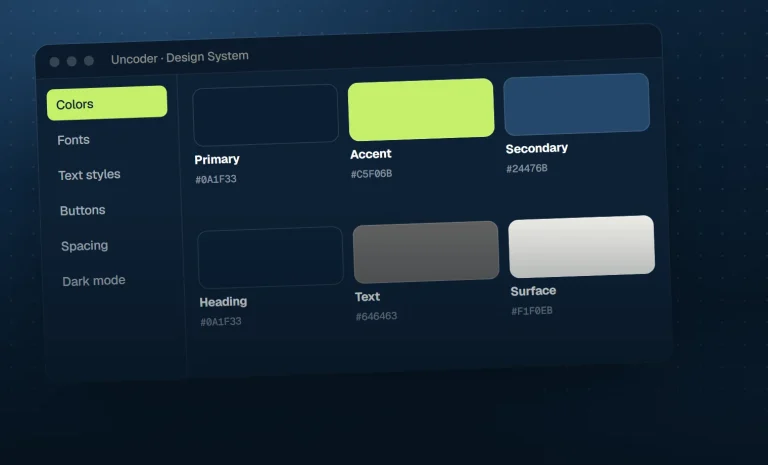
Why we built the Design System before the widgets
AI-built pages only look consistent when the AI has a design system to use. That is why Uncoder’s widgets read every color,…

Site & theme widget
Category pills, dropdowns or a search box that filter a grid of posts without reloading the page.
Build it with your AI
“Add category pills above the post grid that filter it without reloading the page.”
Live demo
AI-built pages only look consistent when the AI has a design system to use. That is why Uncoder’s widgets read every color,…
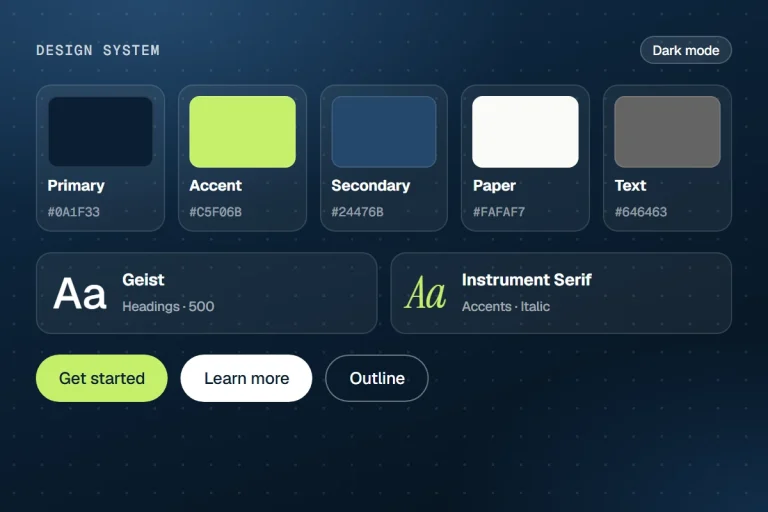
Because every page uses the Design System, a rebrand is a handful of prompts — colors, fonts, buttons, spacing and a contrast…
Settings
Every setting below is in the editor — and available to your AI through get_widget_schema.
13 settings
Filter
Grid anchor ID
Filter by
Taxonomy
Display
Allow several at once
Show “All”
“All” label
Show counts
Hide empty terms
Top-level terms only
Placeholder
Sort options
Label
10 settings
Buttons & fields
Alignment
Gap
Typography
Text color
Background
Border color
Active text
Active background
Radius
Padding
shared
On every element
Spacing & position
Background & border
Animations
Motion & effects
Scroll & mouse effects
Visibility
Conditions
Interactions
Attributes & CSS
Build it with AI
Your AI looks up the Loop Filter settings over MCP and writes the element for you — real, editable and on brand.
Claude · connected to your site
You
Add category pills above the post grid that filter it without reloading the page.
Claude · using Uncoder
Done — it’s on your site and fully editable.
What the AI writes
{
  "type": "loop-filter",
  "settings": {
    "target": "demo-loop",
    "filter": "taxonomy",
    "taxonomy": "category",
    "display": "pills",
    "show_all": true,
    "all_label": "All",
    "exclude": "1",
    "justify": "center"
  }
}
More site & theme widgets
The description of the category, tag or author being viewed, for archive templates.
The name of the category, tag or search being viewed — without the “Category:” prefix if you like.
The author of a post with photo, name, bio and links, at the end of every article.
The post’s featured image, cropped to any ratio, with a fallback for posts without one.
Links to the other languages of a page on WPML and Polylang sites.
Your WordPress menu with dropdowns, columns, icons, hover effects and a mobile menu that can differ from desktop.