A starter template gets you a finished-looking site in minutes. Then you read it. Every heading describes a business that isn’t yours, the phone number reaches nobody, and the team section introduces people you have never met. Replacing all of that text by hand is the slow part of starting from a template.
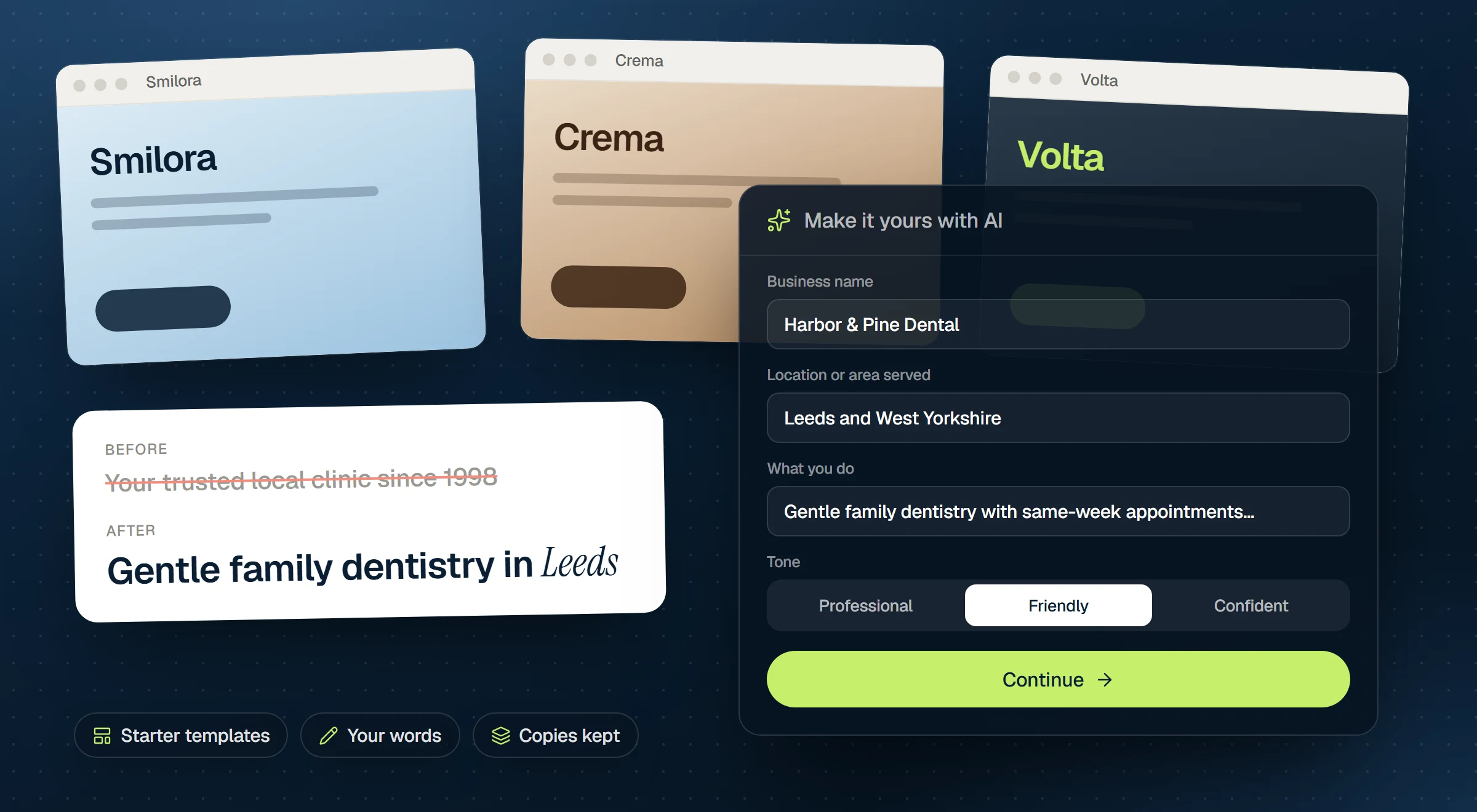
Uncoder splits the job in two: you import a complete starter site, then your own AI app rewrites it for your business with Make it yours.
Pick a starter
Browse the starter template gallery on our site, or open Uncoder → Library → Starter sites in WordPress (the plugin calls them starter sites). In both places you can search by name or keyword, filter by category, such as Local services, Health & wellness or SaaS & tech, and show only free or only Pro starters.
Click a picture or Preview to open the starter’s live demo in a new tab and click through its pages before you import anything. Many starters are free. The others come with a Pro or Agency license.
Import it
Click Import on the card. Nothing on your site changes until you confirm. The dialog lists the parts of the starter: Design System, Theme Builder, Pages & posts, Menus, Images & files, Custom fonts and, for some starters, Blog posts. Untick what you do not want.
If pages, templates or menus with the same names already exist, choose Keep mine, Replace mine or Keep both. Two options are on by default: Activate headers, footers and other templates and Use the kit’s home page.
A few things to know before you click Import:
- Pages come in published. Import into a new site or a staging copy, or turn on coming soon mode while you work.
- Your Design System is replaced by the starter’s colors, fonts, text styles and buttons. A restore point is kept.
- Images and fonts are copied into your media library and custom fonts, so the site does not depend on Uncoder’s servers.
- Imported starters stay. They keep working if your license ends.
Make it yours
Make it yours (Pro and Agency) hands the rewrite to the AI app you already use, such as Claude, ChatGPT or Cursor, connected to your site over MCP. The app rewrites every heading, paragraph, button and list. The layout, images, styles and links stay as they are.
You need no AI key for this. The app works with your own account, and your site never calls an AI service by itself.
Before you start
- A Pro or Agency license active on the site.
- A starter imported.
- An AI app connected under Uncoder → AI & MCP, with the Content permission (and Site, so it can also write the site’s tagline).
Only administrators can use Make it yours.
Describe your business
Click Make it yours with AI at the top of Library → Starter sites, or in the dialog right after an import. Fill in the form: Business name and What you do are required. Location or area served, Services or products, Your customers, Tone, contact details, Language, Opening hours and Anything else are optional, but each one helps.
Two options below the form are on: Use the business name as the site title and Fill the empty Business & SEO details. The second one only fills fields that are still empty; Business & SEO details you already entered are never changed.
Click Continue. Uncoder first keeps a copy of every page and site part, so you can put any of them back later.
Hand the job to your AI app
Click Copy the instruction, open a new chat in the connected app, paste it and send it. The dialog lists every page and site part, and each one changes from Starter text to Rewritten as the app works through them. You can close the dialog in the meantime.
The instruction is strict about facts. The app keeps each text’s job and roughly its length, changes no layout, style or image, and never invents prices, years, awards, names or testimonials. Where the starter shows a detail your answers do not give, it writes a placeholder in square brackets, such as [Price] or [Year founded]. It also writes an SEO title and meta description for each page, and at the end lists every placeholder, figure and HTML widget left.
In Claude, you can also pick the ready-made prompt Make a starter site yours from your site’s connector. It gives Claude the same instruction, and Undo works the same way.
Finish the job
- Fill in the placeholders. Search for
[with Find & replace under Settings → Tools to find every one. - Swap the logo and the photos for your own.
- Fine-tune the Design System. Open Styles in the editor and adjust the colors and fonts to your brand.
- Read each page once before you publish it, and check the figures the app listed.
Changed your mind about a page? Click Undo next to it and confirm with Put it back, or use Undo all. Undo goes back to the texts the page had before its first rewrite, so changes you made to it since then are lost.
The more true facts you give in the form, the fewer placeholders you get. Add your prices, your years in business and the names of your team under Anything else.
On the Free plan
Free starters are yours to import and use. Without Make it yours, edit the texts in the editor or ask your connected AI app:
Rewrite the texts on the Home page for Harbor Dental, a family dental practice in Portland. Keep the layout, images and links as they are.
Get started
Find a design you like in the starter template gallery, and see what each plan includes on the pricing page. The docs cover importing a starter site and Make it yours with AI step by step.